AI in Architectural Visualization: Five Trends We're Actually Using
Every visualization studio is talking about AI this year. Fewer are specific about what it changes in a working pipeline, so this piece is deliberately concrete: five shifts we're seeing in 2025, what each one does to real projects, and where the limits still sit.
Interface has produced architectural visualization for more than three decades, which means we've absorbed several technology waves already: hand rendering to 3D, stills to animation, animation to real-time. AI is the current wave. It's a strong one, and like the others it rewards studios that fold it into an existing craft rather than treating it as a replacement for one.
1. Generative exploration up front
Early-stage design used to be rationed: modeling each massing or styling option cost enough that teams explored three or four. Generative tools now produce design variations from parameters (site dimensions, zoning limits, sustainability targets, stylistic direction) fast enough that the conceptual phase compresses from weeks to days. Stakeholders see more of the option space before anyone commits to detailed modeling, and the dead ends die cheap.
2. Real-time rendering that finally looks finished
Real-time visualization used to mean accepting a video-game look in exchange for interactivity. Neural rendering closed most of that gap: simplified models get photorealistic detail on the fly, and entourage that once flattened a scene (people, vegetation, materials) holds up under scrutiny. In presentations this changes the conversation: a client asks "what does it look like at dusk in November," and the answer appears while they watch instead of arriving as a render next week.
3. Immersive experiences with intelligence behind them
VR and AR matured from novelty walkthroughs into working sales and review tools, and AI does the unglamorous work that makes them feel smooth: predicting where a viewer will move and preloading detail, keeping multi-user sessions coherent, answering questions about materials and features inside the experience. For high-end residential and commercial developments this shows up in the numbers that matter: earlier commitments from buyers and tenants who have already "been in" the space.
4. Visualization That Carries Analysis
The newer capability is visualization that carries analysis: how people will flow through a lobby, where daylight lands in February, how sound behaves in a hall. For performing-arts venues, healthcare, and mixed-use projects, buildings whose success hinges on how they're experienced, this moves visualization from marketing artifact to design instrument.
5. Sustainability you can see
Regulatory and market pressure made environmental performance a selling point, and AI tooling makes it visible. Energy consumption and thermal comfort render across seasons. Material choices show their embodied-carbon consequences. Some tools now project how a design will perform under future climate scenarios, decades out. A chart persuades an engineer; a visualization persuades a board.
What This Looks Like on Real Projects
Capital One Hall. For Capital One's performing-arts venue in Tysons, VA, we combined traditional 3D modeling with AI-assisted lighting and acoustic visualization to build immersive VR experiences while the building was still under construction. Performers and event organizers could understand how the hall would feel and function, which helped secure bookings before completion, and real-time rendering let Capital One's team show different seating configurations and performance types live in stakeholder presentations.
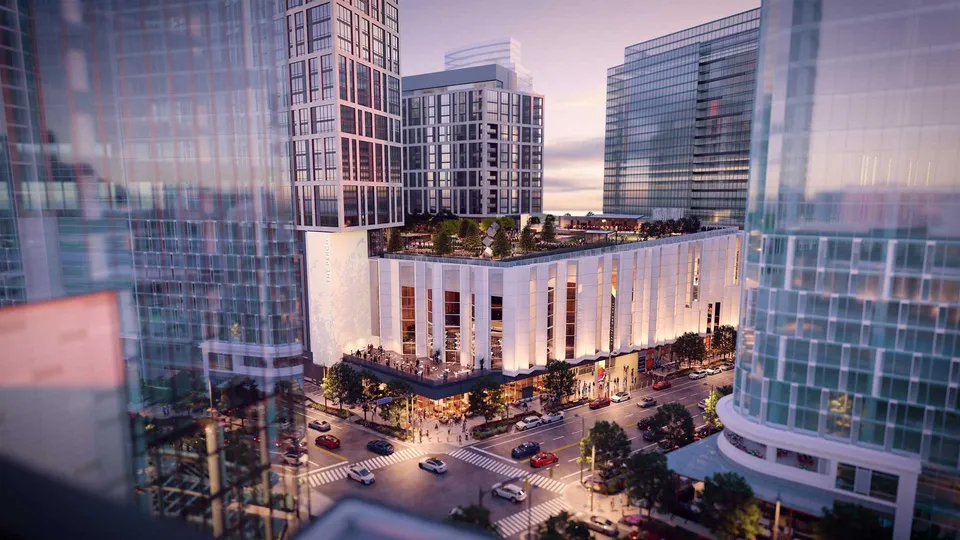
Amaris. For Hoffman Madison Waterfront's Amaris condominiums at The Wharf in Washington, DC (Rafael Viñoly's curved design), the challenge was scale: 96 unique floor plans, each needing high-quality imagery across material selections and lighting conditions. An AI-assisted pipeline made that volume feasible, and generative tools produced multiple interior scenarios per unit type so buyers could see the space as theirs. The 360° VR tours showed views from individual units across times of day and seasons. Neither Capital One Hall nor Amaris would work without the underlying architectural rendering services craft. AI speeds up delivery; it doesn't replace the judgment behind either project.
Adopting This Without Breaking Your Workflow
The pattern that works, in our experience: audit where your current visualization process actually bottlenecks, then adopt one targeted tool there rather than replatforming everything at once. Train the artists you have; the technology amplifies judgment, and judgment is the scarce input. Reassess after real projects, not demos. And if you'd rather not build the capability in-house, work with a studio that already runs it inside an established craft.
The honest summary of 2025: AI hasn't replaced the visualization artist, and nothing on the horizon suggests it will. What it has done is remove the ceiling on how much a small senior team can produce, and raise the floor on what clients expect to see. Both of those favor studios and clients who move early.
Ready to see what this looks like on your project? Contact Interface Multimedia and we'll walk you through recent work.